Google Search Grounding for agents
Google Search Grounding tool is a powerful feature in the Agent Development Kit (ADK) that connects your AI agents directly to Google Search. By giving your agents access to real-time, authoritative information from the web, they can answer questions about recent events, current weather, stock prices, or any other dynamic data that falls outside the model's training window. The agent automatically decides when to search and seamlessly incorporates the results into its responses with proper citations.
Creating a Grounded Agent
To enable Google Search Grounding, you include the search tool in your agent definition.
from google.adk.agents import Agent
from google.adk.tools import google_search

root_agent = Agent(
    name="google_search_agent",
    model="gemini-2.5-flash",
    instruction="Answer questions using Google Search when needed. Always cite sources.",
    description="Professional search assistant with Google Search capabilities",
    tools=[google_search]
)
import { LlmAgent, GOOGLE_SEARCH } from '@google/adk';

const rootAgent = new LlmAgent({
    name: "google_search_agent",
    model: "gemini-2.5-flash",
    instruction: "Answer questions using Google Search when needed. Always cite sources.",
    description: "Professional search assistant with Google Search capabilities",
    tools: [GOOGLE_SEARCH],
});
import com.google.adk.agents.LlmAgent;
import com.google.adk.tools.GoogleSearchTool;

LlmAgent rootAgent = LlmAgent.builder()
    .name("google_search_agent")
    .model("gemini-2.5-flash")
    .instruction("Answer questions using Google Search when needed. Always cite sources.")
    .description("Professional search assistant with Google Search capabilities")
    .tools(GoogleSearchTool.INSTANCE)
    .build();
How grounding with Google Search works
Grounding is the process that connects your agent to real-time information from the web, allowing it to generate more accurate and current responses. When a user's prompt requires information that the model was not trained on, or that is time-sensitive, the agent's underlying Large Language Model intelligently decides to invoke the google_search tool to find the relevant facts.
Data Flow Diagram
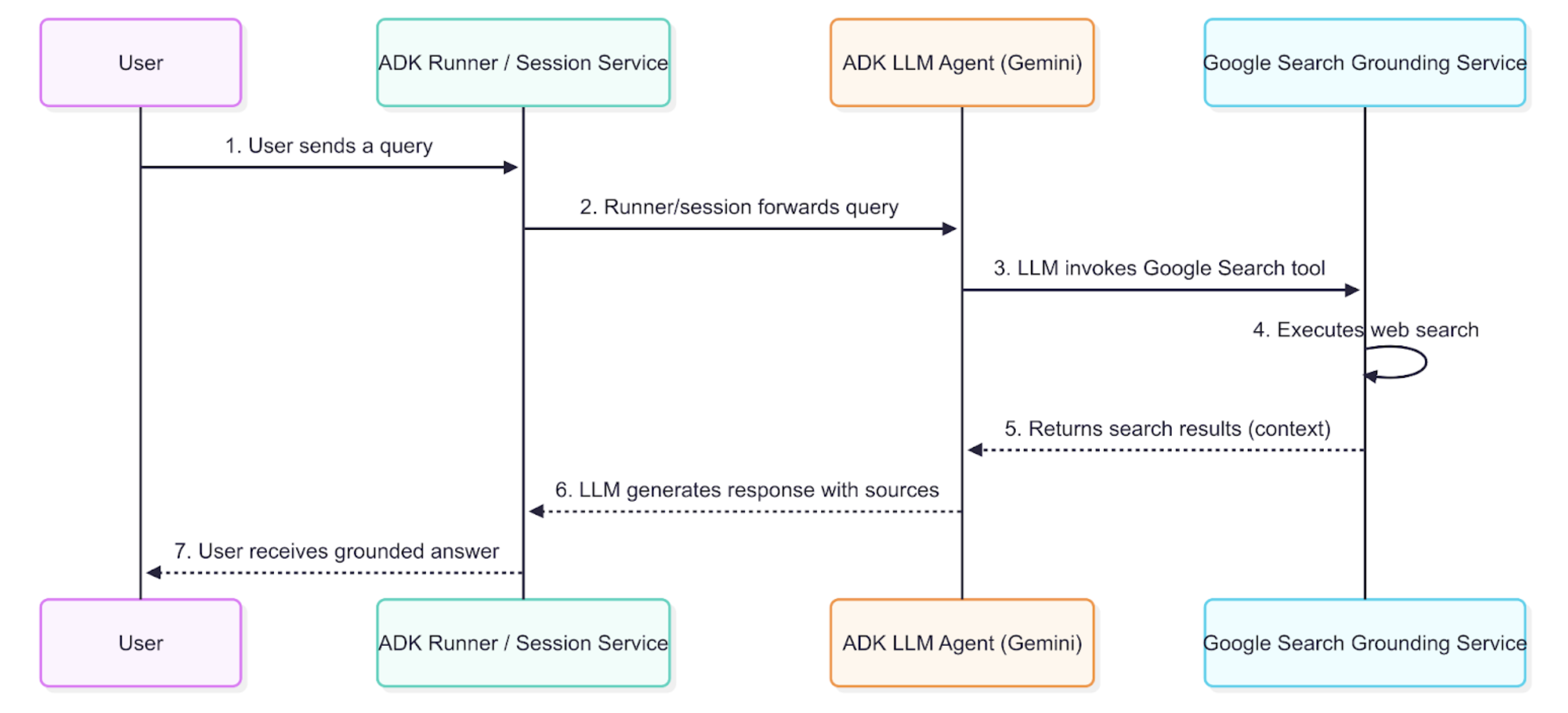
This diagram illustrates the step-by-step process of how a user query results in a grounded response.
Detailed Description
The grounding agent uses the data flow described in the diagram to retrieve, process, and incorporate external information into the final answer presented to the user.
- User Query: An end-user interacts with your agent by asking a question or giving a command.
- ADK Orchestration: The Agent Development Kit orchestrates the agent's behavior and passes the user's message to the core of your agent.
- LLM Analysis and Tool-Calling: The agent's LLM (e.g., a Gemini model) analyzes the prompt. If it determines that external, up-to-date information is required, it triggers the grounding mechanism by calling the
google searchtool. This is ideal for answering queries about recent news, weather, or facts not present in the model's training data. - Grounding Service Interaction: The
google searchtool interacts with an internal grounding service that formulates and sends one or more queries to the Google Search Index. - Context Injection: The grounding service retrieves the relevant web pages and snippets. It then integrates these search results into the model's context before the final response is generated. This crucial step allows the model to "reason" over factual, real-time data.
- Grounded Response Generation: The LLM, now informed by the fresh search results, generates a response that incorporates the retrieved information.
- Response Presentation with Sources: The ADK receives the final grounded response, which includes the necessary source URLs and
groundingMetadata, and presents it to the user with attribution. This allows end-users to verify the information and builds trust in the agent's answers.
Understanding the Error Response and Grounding Metadata
When the agent uses Google Search to ground a response, it returns a detailed set of information that includes not only the final text answer but also the sources it used to generate that answer. This metadata is crucial for verifying the response and for providing attribution to the original sources.
Example of a Grounded Response
The following is an example of the content object returned by the model after a grounded query.
Final Answer Text:
"Yes, Inter Miami won their last game in the FIFA Club World Cup. They defeated FC Porto 2-1 in their second group stage match. Their first game in the tournament was a 0-0 draw against Al Ahly FC. Inter Miami is scheduled to play their third group stage match against Palmeiras on Monday, June 23, 2025."
Grounding Metadata Snippet:
"groundingMetadata": {
  "groundingChunks": [
    { "web": { "title": "mlssoccer.com", "uri": "..." } },
    { "web": { "title": "intermiamicf.com", "uri": "..." } },
    { "web": { "title": "mlssoccer.com", "uri": "..." } }
  ],
  "groundingSupports": [
    {
      "groundingChunkIndices": [0, 1],
      "segment": {
        "startIndex": 65,
        "endIndex": 126,
        "text": "They defeated FC Porto 2-1 in their second group stage match."
      }
    },
    {
      "groundingChunkIndices": [1],
      "segment": {
        "startIndex": 127,
        "endIndex": 196,
        "text": "Their first game in the tournament was a 0-0 draw against Al Ahly FC."
      }
    },
    {
      "groundingChunkIndices": [0, 2],
      "segment": {
        "startIndex": 197,
        "endIndex": 303,
        "text": "Inter Miami is scheduled to play their third group stage match against Palmeiras on Monday, June 23, 2025."
      }
    }
  ],
  "searchEntryPoint": { ... }
}
How to Interpret the Response
The metadata provides a link between the text generated by the model and the sources that support it. Here is a step-by-step breakdown:
- groundingChunks: This is a list of the web pages the model consulted. Each chunk contains the title of the webpage and a
urithat links to the source. - groundingSupports: This list connects specific sentences in the final answer back to the
groundingChunks. - segment: This object identifies a specific portion of the final text answer, defined by its
startIndex,endIndex, and the text itself. - groundingChunkIndices: This array contains the index numbers that correspond to the sources listed in the
groundingChunks. For example, the sentence "They defeated FC Porto 2-1..." is supported by information fromgroundingChunksat index 0 and 1.
How to display grounding responses with Google Search
A critical part of using grounding is to correctly display the information, including citations and search suggestions, to the end-user. This builds trust and allows users to verify the information.
Displaying Search Suggestions
The searchEntryPoint object in the groundingMetadata contains pre-formatted HTML for displaying search query suggestions. These are typically rendered as clickable chips that allow the user to explore related topics.
Rendered HTML from searchEntryPoint: The metadata provides the necessary HTML and CSS to render the search suggestions bar, which includes the Google logo and chips for related queries. Integrating this HTML directly into your application's front end will display the suggestions as intended.
For more information, consult using Google Search Suggestions in Vertex AI documentation.